

Applicable only for eNACH and Physical NACH mandates.
- You can do this without requiring additional authorisation from your customer.
- Use a single interface or payment gateway to control all mandates.
- Provide a seamless experience for customers even if you switch from one gateway to another.
Initiate porting process
Cashfree will assist you throughout the mandate porting process.1
Contact Cashfree support
Contact the Cashfree support team to initiate the porting process. Nominate Cashfree as your preferred payment processing partner for your Utility Code or mandates.
2
Partner bank coordination
Once you have initiated the process, the Cashfree team will guide you through sharing the list of mandates with your partner bank. This ensures the partner bank’s systems are updated to reflect the change.
3
Import mandates into Cashfree
Import the updated list of mandates into Cashfree’s system.
4
Start processing payments
Once the mandates are successfully imported, you can begin processing payments through Cashfree.
Import mandates to Cashfree
To import the mandates, upload a file containing all mandate details in either the NPCI file format or the Cashfree-specified format. After uploading, download the mandate file to check the import status. The file also includes rejection reasons for mandates that could not be imported.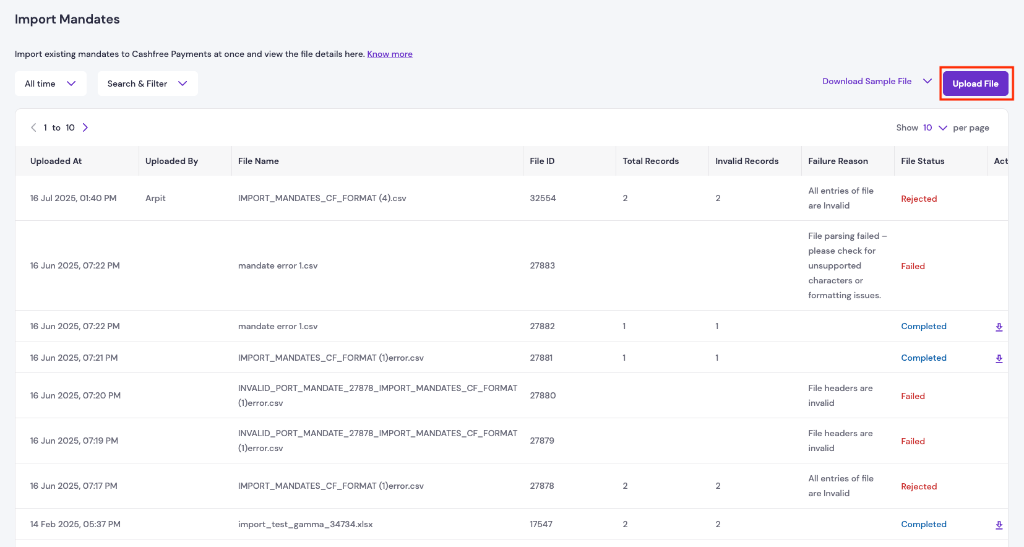
Import mandates overview
File format
Conditional fields
Optional fields