

- Bank account (e-Mandate + Physical mandate)
- UPI autopay
- Standing Instructions (SI) on cards (credit or debit) (Indian and International)
Additional Factor Authentication (AFA): Customers must authorise the debit by providing additional authentication. For UPI autopay, customers enter their UPI PIN within 30 minutes of receiving the link or PSP app notification. For Standing Instructions (SI) on cards, customers enter a One-Time Password (OTP) or other 2FA as required by the issuing bank, which can be completed any time before 7:00 AM on the scheduled charge date.
Supported banks and PSPs:
- eNACH: Navigate to E-mandate > Live Bank in API E-mandate > Destination bank on the NPCI site to view or download the list of supported banks
- UPI autopay: Banks and PSPs
- Physical mandates: Supported banks
Supported payment frequencies
All payment methods support the following frequencies: Day, Week, Month, Year, and ad-hoc.Bank account (e-Mandate)
Customers can authorise subscriptions using their bank account via net banking, debit card, or Aadhaar. They must enter their bank account details and authorise the subscription. The payment is debited automatically based on the selected plan.Account eligibility: According to NACH guidelines, e-NACH is permitted only for individual accounts, including both savings and current accounts with a single registered signatory. Corporate current accounts with multiple registered signatories must use physical NACH.Authorisation amount: There is no authorisation amount charged for e-NACH. The charge is zero (0).
Authorise using a bank account
Complete the following steps on the checkout page to authorise a subscription using a bank account:- Select Bank Account (e-Mandate) as the payment method.
- Select their bank and the preferred authorisation mode: Net Banking, debit card, or Aadhaar (depending on availability for the bank).
- Enter the required details, and approve the subscription.
Bank account (Physical mandate)
Customers can authorise subscriptions using only their signature and bank account details. There is no requirement to have a debit card or net banking enabled to set up the mandate. The physical NACH form includes several fields that can be pre-filled to simplify the process. Leave the UMRN (Unique Mandate Reference Number) field blank when creating a mandate. Cashfree provides values for the Sponsor Bank Code, Utility Code, and Authoriser Information. Refer to the sample physical mandate below.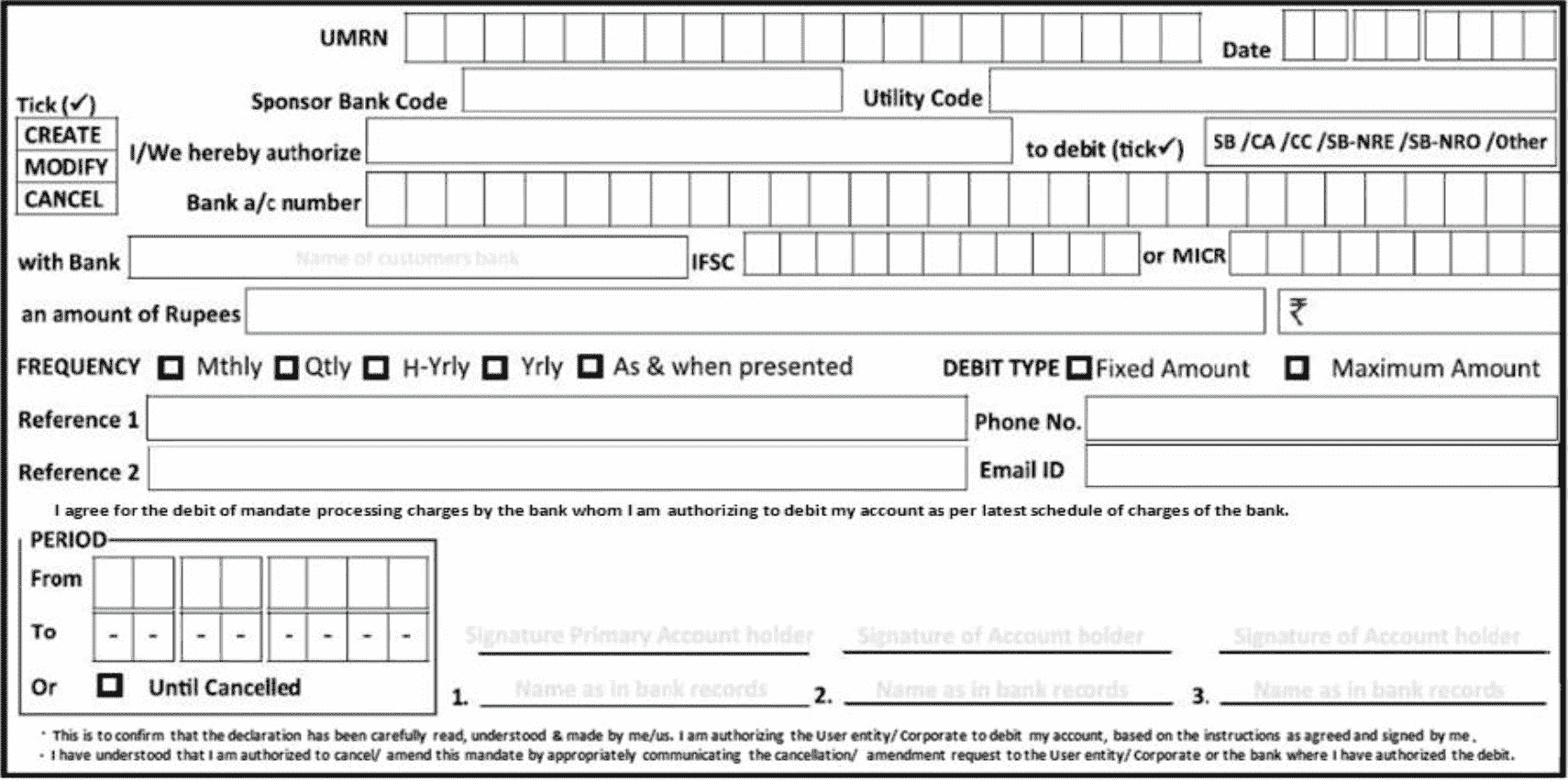
Pre-fill physical mandate fields
You can pre-fill the following fields to simplify the form completion process:- Date: The date when the form is filled.
- Frequency: Select an appropriate option based on your use case: Monthly, Quarterly, Half-yearly, Yearly, or As and when presented.
- Amount: The mandate amount to be debited.
- Debit type: Select Fixed Amount for recurring payments or Maximum Amount for on-demand debits.
- Reference 1 and Reference 2 (optional): Use these fields to add internal remarks, subscription IDs, or other identifiers relevant to your system.
- Period of mandate: Enter the mandate duration, from the first debit date to the subscription end date. To keep the mandate active until cancelled, select Until Cancelled.
Submit completed physical mandate forms
When you receive the completed form, choose one of the following options:- Use the Bulk Physical Mandate feature on the Cashfree dashboard to upload the details, or
- Integrate using the following Cashfree APIs:
- Create subscription: Use this API to create a subscription for your customer. This includes providing customer and mandate details. If the mandate details such as amount and frequency are the same for all your customers, you can create a plan before creating a subscription. The response provides the list of supported banks applicable for physical mandate.
- Step 2: Upload file: Use the Upload File API to upload the physical Nach registration forms that contain your customer’s bank account details, mandate details and signature. You will receive a file ID in the response, this needs to be used in the next step.
- Step 3: Create auth seamless physical mandate: Use the Create Auth Seamless Physical Mandate API to create an authorisation request for your customer. For physical mandates, this API informs Cashfree Payments that the NACH form should be submitted to the bank for mandate registration in production. The final authorisation status for a physical NACH (paper) mandate typically takes between 5 to 10 working days to appear, depending on the bank’s processing speed and verification.
Debit or credit card (issued in India)
Customers can authorise subscriptions using their debit or credit card. They must enter their card details to authorise the subscription, similar to a regular one-time online payment. The payment is automatically debited based on the selected plan. All issuing banks support credit and debit card payments. Standing Instructions (SI) on cards are supported on Visa, Mastercard, and RuPay cards.Debit or credit card (issued outside India)
Customers can authorise subscriptions using their debit or credit card. They must enter their card details to authorise the subscription, similar to a regular one-time online payment. The payment is automatically debited based on the selected plan. All issuing banks support credit and debit card payments, and 140+ currencies are supported. Standing Instructions (SI) on international cards are supported on Visa and Mastercard cards.UPI Autopay
Payments for subscriptions via UPI provide customers the flexibility to pay using any UPI application. Customers must first enter their UPI VPA and authorise the subscription. UPI Autopay is supported for all methods via Intent Flow, Collect Flow, and QR Flow. For mandates where the debit amount exceeds ₹15,000, customers must enter their UPI PIN on the collect request triggered to their VPA. No customer input is required for debit amounts less than ₹15,000.NPCI guidelines: Starting August 1, 2025, UPI Autopay transactions are processed only during non-peak hours: before 10:00 AM, between 1:00 PM and 5:00 PM, or after 9:30 PM. For more information, refer to the NPCI guidelines.RBI guidelines for specific payment types: For mutual fund payments, credit card payments, and insurance premium payments, no customer input is required for debit amounts up to ₹1,00,000.