Transaction lifecycle
The following diagram shows how transactions progress from order creation to final state: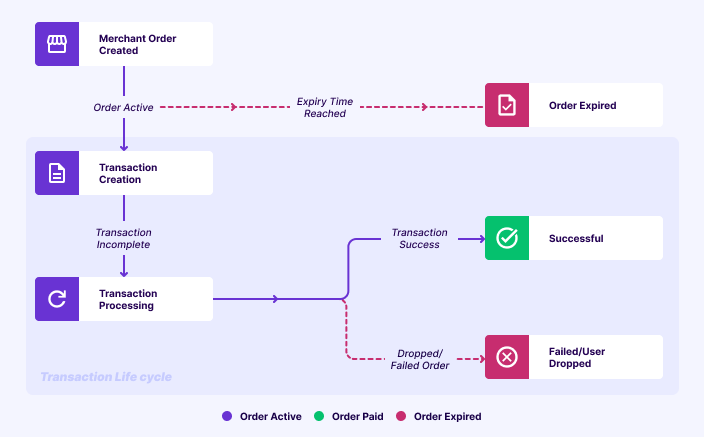
Key concepts
Two critical concepts in payment flows are order expiry time and Transaction Time Limit (TTL). Understanding these concepts helps you manage your payment flows effectively.Transaction time limit
Transaction Time Limit, also referred to as Transaction Completion Time (TCT), defines the maximum time allowed for a payment attempt.During this period, the transaction will reach one of the following final statuses: SUCCESS, FAILED, or USER DROPPED.
It ensures predictable transaction behaviour and helps minimise financial risk for both merchants and customers.
Order expiry time
Order expiry time specifies the duration for which an order remains valid and can be used to initiate a new payment attempt.Order expiry time vs TTL
Order finalisation process
The following steps describe how a payment is finalised:- Payment succeeds within TTL → Order is PAID, even if order expiry time passed.
- An order marked as EXPIRED can still move to PAID if a payment attempt was started before the expiry and completed successfully within the TTL window, even if the confirmation comes after the expiry time.
- If payment fails or the user drops → Order remains EXPIRED.
- When TTL ends, any non-terminal payments are automatically closed in a terminal state.
How order expiry time and TTL work
- Order creation time: 10:00 AM
- Order expiry time: 15 minutes
- TTL: 20 minutes
- No payment attempt: If the customer does not select any payment method → Order moves from ACTIVE to EXPIRED at 10:15 AM
- Payment attempt before expiry:
- Customer selects a payment method at 10:02 AM
- TTL starts → transaction allowed until 10:22 AM
- Even though the order expiry time is 10:15 AM, since a payment attempt is in progress, Cashfree waits until 10:22 AM
- At 10:15 AM order moved to EXPIRED status.
- If payment succeeds at 10:21 AM → Order status will change from EXPIRED to PAID.
- If payment fails or is dropped → Order remains EXPIRED.
Order TTL flowchart
The following flowchart shows how order expiry time and TTL affect an order’s final state: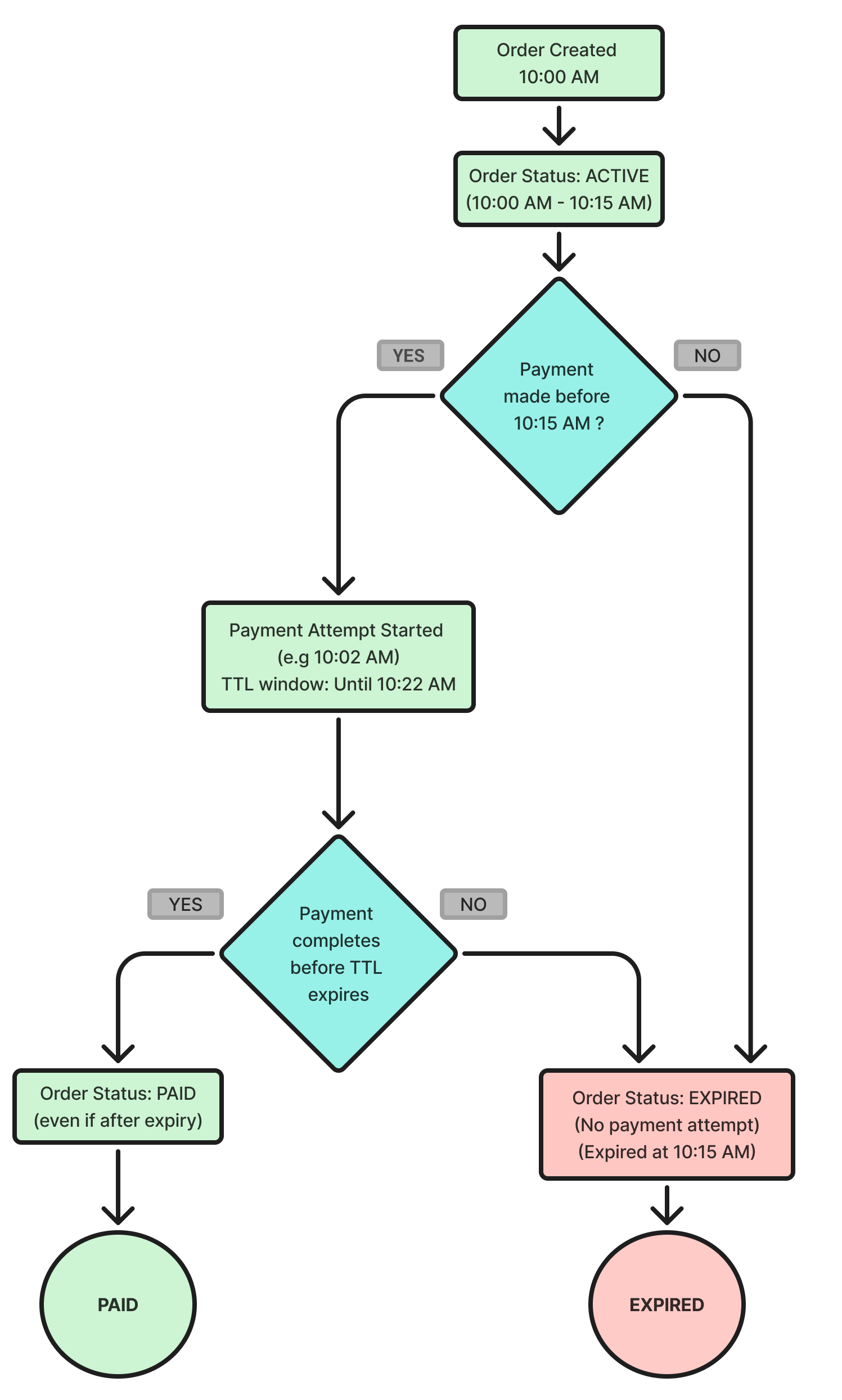
Significance of TTL
TTL helps prevent financial loss and ensures a smoother customer experience in scenarios such as:- Customers initiate payment just before order expiry.
- Banks or Payment Service Providers (PSPs) take additional time to confirm transactions.
Use cases
TTL is especially critical for industries where prices fluctuate rapidly, such as stock trading platforms, airline ticket sales, commodities, and flash sales. Example: Flight fares may change every minute. With TTL, once a customer locks a price by initiating payment, Cashfree continues to wait for confirmation even if the order has technically expired, ensuring the transaction is honoured at the locked price.Configure order expiry time and TTL
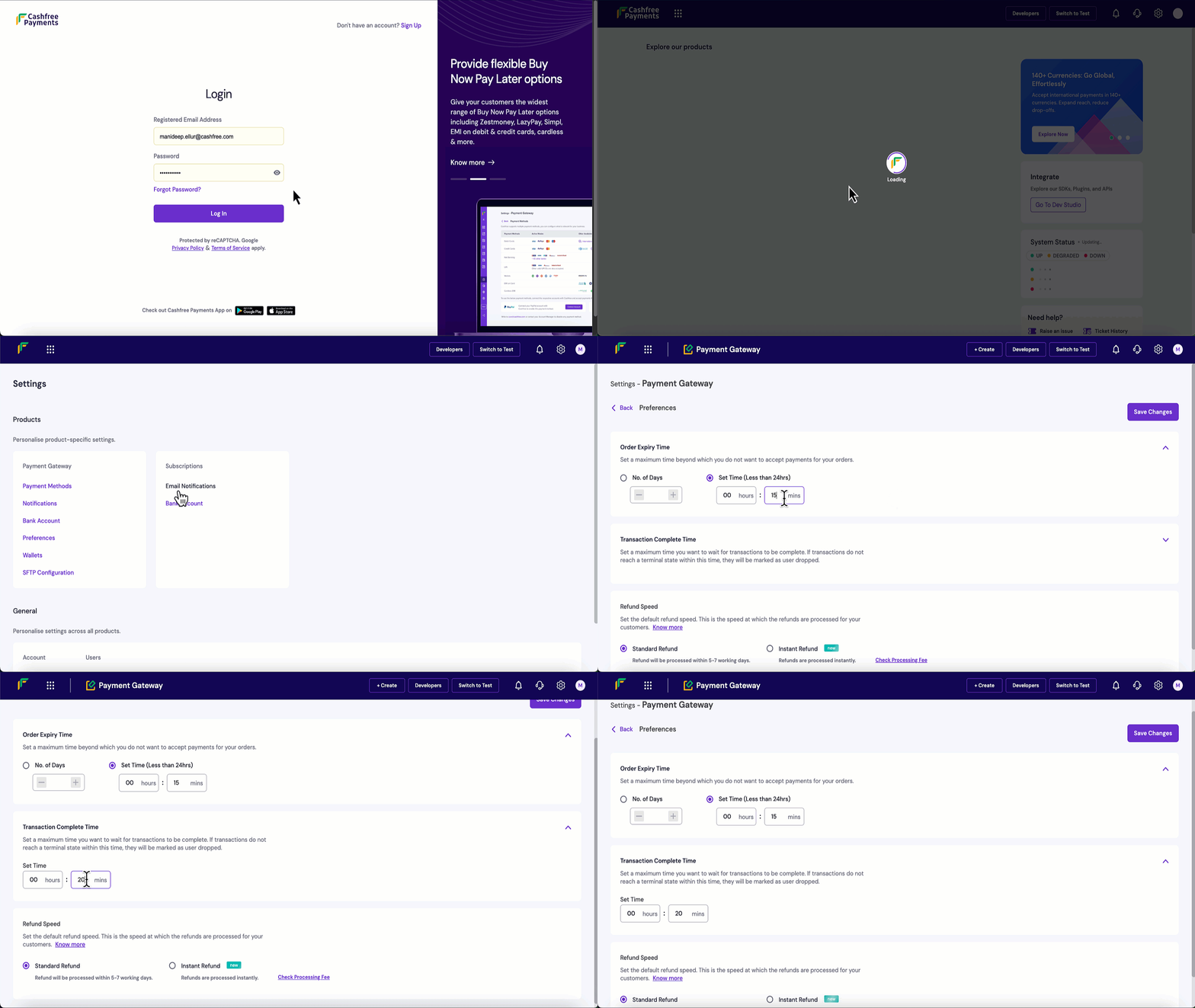
Follow these steps to configure order expiry time and TTL in the Merchant Dashboard:- Log in to the Merchant Dashboard.
- Navigate to Settings > Preferences.
- Set order expiry time: Minimum 5 minutes, maximum 30 days.
- Set TTL: Minimum 5 minutes, maximum 24 hours.
- Select Save Changes to apply your updates.